

 Multiple Faces Detected


 April 5th, 2024
The IRS (Internal Revenue Service) is a government agency responsible for collecting taxes and enforcing tax laws in the United States. Unfortunately, scammers often use the IRS name and logo to trick people into giving away personal information or money. One common scam is the irs.gov email scam, where scammers send fake emails claiming to be from the IRS in order to steal sensitive information or money from unsuspecting victims.
How the Scam Works
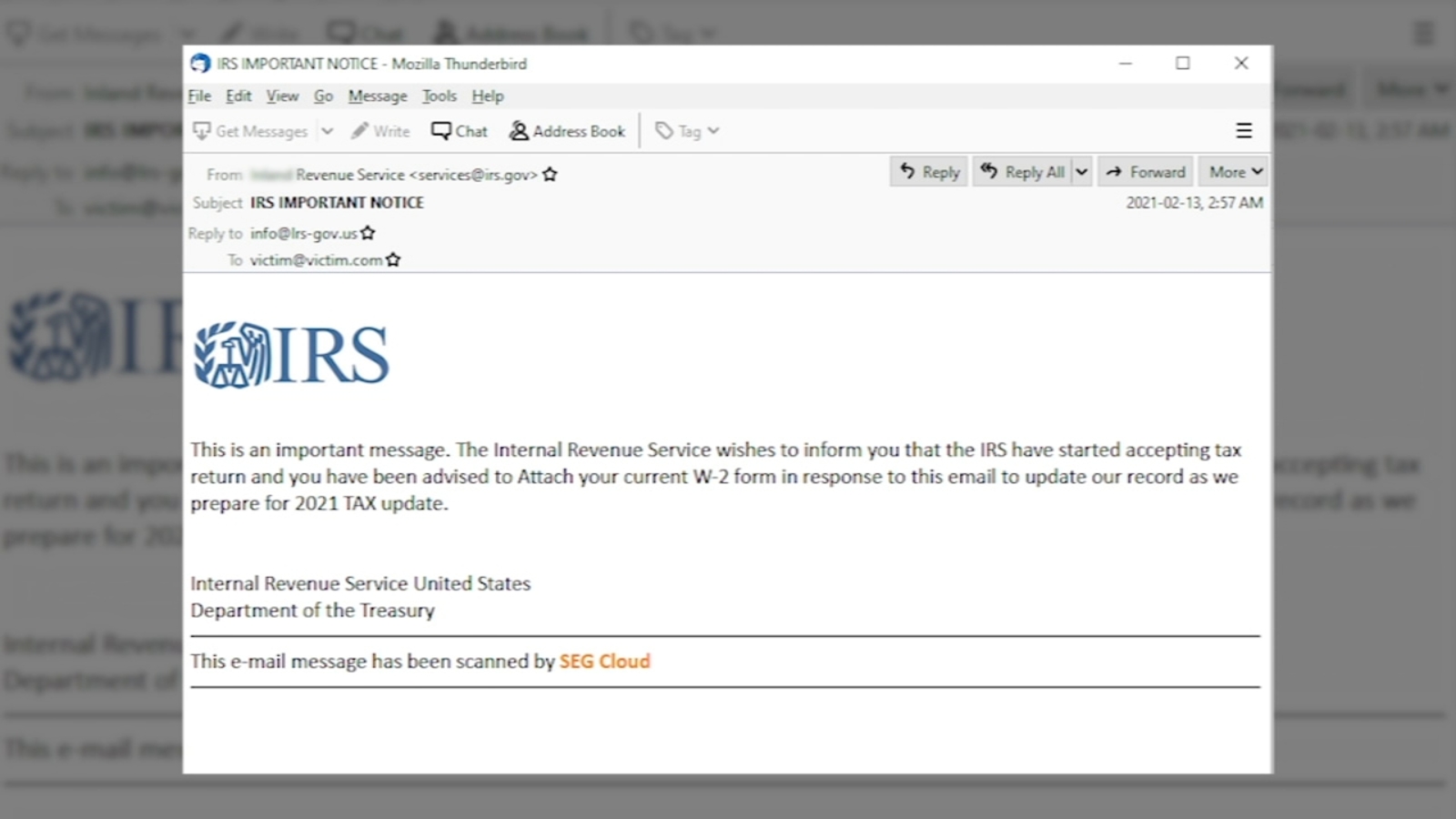
The irs.gov email scam typically starts with an email that appears to be from the IRS. The email may have the IRS logo and a professional-looking email address, making it seem legitimate. The subject line may also be designed to catch your attention, such as “Important Tax Information” or “Urgent Notice from the IRS.”
The email will usually claim that there is an issue with your taxes or that you are eligible for a tax refund. It may also threaten legal action if you do not respond or provide the requested information. The email will then ask you to click on a link or open an attachment to provide the necessary information.
However, these links and attachments are not from the IRS. They are designed to look like official IRS forms or websites, but they are actually fake. If you click on the link or open the attachment, you may be directed to a fake website that asks for personal information, such as your Social Security number, bank account information, or credit card details. Alternatively, the attachment may contain malware that can infect your computer and steal your personal information.
How to Spot the Scam
It’s important to know how to spot the irs.gov email scam to protect yourself from becoming a victim. Here are some red flags to look out for:
- The email is unsolicited. The IRS will never initiate contact with you via email, text message, or social media. They will always send official correspondence through the mail.
- The email contains spelling and grammar errors. Official IRS communications are carefully reviewed and edited, so any mistakes are a sign that the email is a scam.
- The email asks for personal information. The IRS already has your personal information on file, so they will never ask you to provide it via email.
- The email threatens legal action. The IRS will never threaten to arrest you or take legal action against you via email.
- The email has a sense of urgency. Scammers often use urgency to pressure victims into acting quickly without thinking.
- The email contains a suspicious link or attachment. If you hover your mouse over the link, you may see that it leads to a different website than the official IRS website. Similarly, if you are unsure about an attachment, do not open it.
IRS Policies on Communication
The IRS (Internal Revenue Service) maintains strict policies on communication with taxpayers to ensure transparency and protect against fraudulent activity. As a government agency responsible for collecting taxes, the IRS primarily uses traditional mail as its official means of correspondence with taxpayers. This approach is designed to provide a verifiable paper trail and reduce the risk of fraudulent impersonation or scams, such as the irs.gov email scam. By relying on physical mail, the IRS aims to uphold the integrity of its communication channels and minimize the likelihood of unauthorized access to sensitive taxpayer information.
It’s important for taxpayers to understand that the IRS will never initiate contact with them via email, text message, or social media for matters related to taxes. Any unsolicited communication claiming to be from the IRS through these channels should be treated with suspicion. Taxpayers should be particularly cautious of emails requesting personal information or payment, as these are common tactics used by scammers in phishing attempts. By adhering to these communication policies, the IRS aims to protect taxpayers from falling victim to fraudulent schemes and safeguard their sensitive data.
In instances where the IRS needs to reach out to a taxpayer, such as to request additional information or address a tax-related issue, they will do so through official correspondence sent by mail. This mail will typically include clear instructions on how to respond and verify the legitimacy of the communication. Taxpayers should carefully review any correspondence they receive from the IRS, paying attention to details such as official letterhead, contact information, and instructions for responding. By following these guidelines, taxpayers can ensure that they are engaging with legitimate IRS communications and avoid falling victim to scams or identity theft.
In cases where taxpayers have doubts about the authenticity of an IRS communication or suspect fraudulent activity, they are encouraged to contact the IRS directly using verified contact information. The IRS provides resources for reporting suspicious activity, such as phishing attempts or scams, including email addresses and phone numbers specifically designated for this purpose. By promptly reporting suspicious activity and seeking guidance from the IRS, taxpayers can help protect themselves and others from falling victim to fraudulent schemes.
What to Do if You Receive an IRS Email Scam
If you receive an email that you suspect is an irs.gov email scam, do not respond or click on any links or attachments. Instead, follow these steps:
- Forward the email to phishing@irs.gov. This is the official email address for reporting phishing scams to the IRS.
- Delete the email from your inbox and trash folder.
- If you clicked on a link or opened an attachment, run a virus scan on your computer.
- If you provided personal information, contact the IRS Identity Protection Specialized Unit at 1-800-908-4490.
- Monitor your bank and credit card statements for any suspicious activity.
Protecting Yourself from Scams
In addition to being aware of the irs.gov email scam, there are other steps you can take to protect yourself from scams in general:
- Be cautious of unsolicited emails, texts, and phone calls asking for personal information or money.
- Do not click on links or open attachments from unknown sources.
- Keep your computer and mobile devices updated with the latest security software.
- Use strong and unique passwords for your online accounts.
- Regularly check your bank and credit card statements for any unauthorized charges.
- If you are unsure about the legitimacy of an email or website, contact the company or organization directly using a verified phone number or email address.
Staying Informed and Educated
Staying informed and educated about IRS policies and common scams is crucial for taxpayers to protect themselves from fraudulent activities. The IRS regularly updates its website with information about scams, phishing attempts, and other fraudulent schemes targeting taxpayers. By regularly checking the IRS website for updates and guidance, taxpayers can stay informed about the latest tactics used by scammers and learn how to recognize and avoid them.
In addition to the IRS website, taxpayers can also benefit from educational resources provided by reputable financial institutions, government agencies, and consumer protection organizations. These resources often include articles, videos, and interactive tools designed to educate taxpayers about common scams, identity theft, and best practices for safeguarding personal information. By taking advantage of these resources, taxpayers can enhance their awareness and knowledge of potential threats and develop strategies to mitigate risks effectively.
Another valuable source of information for taxpayers is community outreach programs and workshops organized by local government agencies or nonprofit organizations. These events may cover topics such as tax preparation, fraud prevention, and financial literacy, providing taxpayers with the opportunity to ask questions, share experiences, and learn from experts in the field. By participating in these events, taxpayers can gain valuable insights and practical advice to help them navigate tax season and protect themselves from scams.
Furthermore, taxpayers can subscribe to newsletters, blogs, or social media accounts dedicated to cybersecurity, personal finance, or consumer protection. These channels often share timely updates, tips, and alerts about emerging threats and scams, keeping subscribers informed and empowered to take proactive measures to safeguard their financial and personal information. By staying connected to reliable sources of information, taxpayers can stay ahead of scammers and make informed decisions to protect themselves and their finances.
Conclusion
The irs.gov email scam is just one of many scams that use the IRS name and logo to trick people into giving away personal information or money. By being aware of the red flags and taking precautions to protect yourself, you can avoid falling victim to this scam and others like it. Remember, the IRS will never initiate contact with you via email, so if you receive an unsolicited email claiming to be from the IRS, it is most likely a scam.









