

 Multiple Faces Detected



 June 2nd, 2026
Ever wonder who’s behind a mysterious Snapchat username? Maybe you got a friend request from someone you don’t recognize, or you want to verify someone’s identity before connecting. Snapchat doesn’t make it easy to find detailed profile information — but the right tools can uncover the real person behind any username.
A reverse Snapchat lookup, also called a reverse username lookup, lets you identify who owns a specific Snapchat handle. Enter the username into a search tool to uncover the person’s real name, other social profiles, and contact information.
Social Catfish’s reverse username search scans comprehensive databases to find the person’s real identity, other online profiles, and contact details — all in one confidential search. Free to start.
How to Find a Snapchat Username
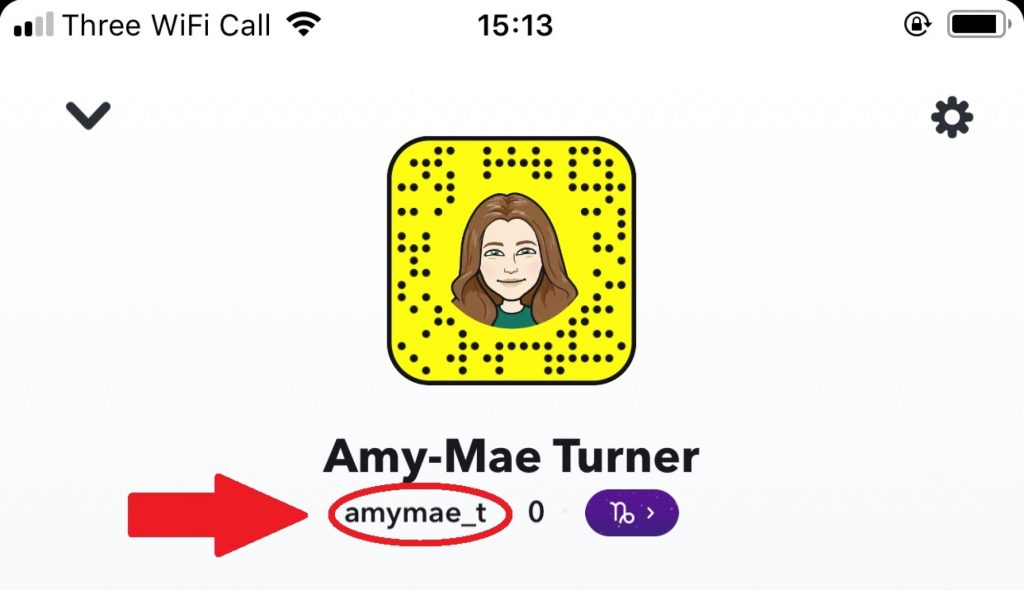
If you’re trying to reverse search someone on Snapchat, the first step is often simply figuring out their exact username. Unlike display names (which can be changed anytime), Snapchat usernames are unique and don’t change, so once you have one, your search becomes much easier.
Here are a few reliable ways to find a friend’s Snapchat username:
Check other social media profiles
Many people list their Snap handle in their Instagram bio, TikTok profile, X (Twitter) header, or even Facebook “About” section. Look for phrases like Snap, Snapchat, Add me on Snap, or a ghost emoji ?.
Look at their phone contacts
If you already have their number saved, open Snapchat and enable contact syncing. Snapchat will suggest people from your contacts and often shows their exact username under their display name.
Search their name directly in Snapchat
Type their full name, nickname, or known display name into Snapchat search. If multiple results show up, profile photos, mutual friends, location clues, or Bitmoji style can help you spot the right person.
Ask mutual friends (discreetly)
If you share connections, a simple “What’s their Snap?” can save time, especially when their username isn’t obvious.
If you still can’t find it… Use Social Catfish
Sometimes people keep their Snapchat hidden or use a username that’s totally different from their real name. In that case, try looking them up through Social Catfish using whatever you do have: a phone number, email, name, or photo. Once Social Catfish surfaces related accounts or usernames tied to that identity, you can narrow in on their Snapchat handle faster and with more confidence.
Finding the right username is the key that unlocks everything else, once you have it, you can move on to verifying who’s really behind the account
Snapchat Username Lookup — How to Search Once You Have the Handle
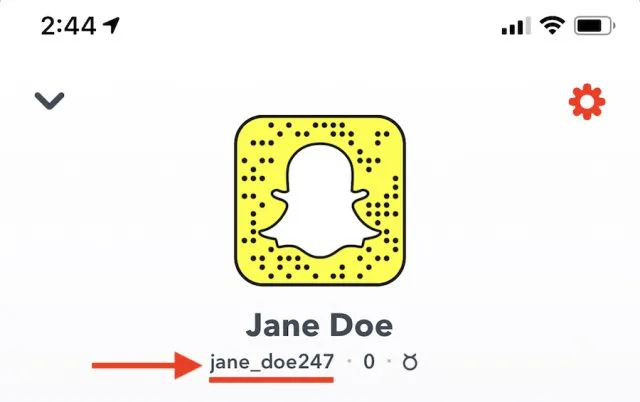
Once you’ve retrieved the username, you can type it into Google. If the person uses a different username for their other social media profiles, it will make this method much harder to yield results. For more information on this, click here.
Sometimes, however, a free Snapchat username lookup approach works because you can figure out the first and last name through the username, as it’s often a combination of their first and last names. If you can figure it out this way, you could find yourself with results from Google or by using a Snapchat account lookup tool.
A profile picture will also help you search Snapchat username, as many people use the same picture for their different accounts.
Direct Snapchat URL check (no app needed): Go to snapchat.com/add/username in any browser, replacing “username” with the handle you’re looking for. If the account exists and hasn’t been set to private, their public profile will load without requiring you to log in or have the app installed.
A profile picture will also help you find a Snapchat username, since many people use the same picture across different accounts.
How to Search Snapchat Without the App
The most common reason people want to search Snapchat without the app is simple: they either don’t have a Snapchat account, don’t want to create one, or want to look someone up anonymously without being visible on the platform.
Browser URL method (fastest free check): Visit https://www.snapchat.com/add/[username] in any browser. This works without logging in and without installing the app. If the account exists and has a public profile, you’ll see their display name, Bitmoji, and Snapcode. If it returns a 404 or blank page, the account doesn’t exist or the username is wrong.
Google search: Search the username in quotes: "username" + Snapchat. This surfaces any public mentions of that Snapchat handle across Google-indexed pages — other social profiles, forum posts, or websites where they’ve listed their Snapchat.
Cross-platform username search: Most people reuse usernames. If you have their Instagram, TikTok, or Twitter handle, search it directly at snapchat.com/add/[handle]. There’s a good chance they use the same username on Snapchat.
Social Catfish username search (most thorough): The most effective way to perform a Snapchat username search without the app is through Social Catfish’s reverse username search. Enter the username and Social Catfish instantly accesses comprehensive databases to find the account owner’s identity, connected social media profiles, phone numbers, and email addresses, all without installing Snapchat or creating an account. Search here.
How to Look Up Snapchat Account Details by Username
When you find a Snapchat account, what can you actually see? Understanding what a lookup returns helps you know whether you’ve found the right person.
What Snapchat shows publicly on a profile:
- Display name (which can differ from the username)
- Bitmoji avatar
- Snapcode (the QR-style code unique to the account)
- Snap Score (visible to friends only)
- Linked accounts (Spotify, etc., if the user has enabled this)
- Mutual friends (if you’re both on Snapchat)
What a reverse username lookup via Social Catfish returns:
- Real name associated with the username
- Other social media profiles linked to the same handle
- Phone numbers and email addresses tied to the identity
- Public records connections — address history, location data
- Associated accounts across dating apps and other platforms
This is the difference between what Snapchat shows inside the app and what a dedicated account information lookup can surface externally. For most verification use cases- checking if someone is who they claim to be, finding a real name behind a handle, or confirming identity before meeting someone, the external lookup is what you actually need. Run a Snapchat account lookup here.
How to Search Snapchat by Name (Not Username)
Snapchat does not support searching by real name in the way most people expect. The app uses usernames as the primary identifier — typing a full name into Snapchat’s search bar may return results for popular public accounts but will typically miss regular private users.
If you have their real name but not their username:
Start with their other social profiles. Most people list their Snapchat handle somewhere public, check their Instagram bio, TikTok profile, Twitter/X header, or Facebook contact information for a Snap username.
Google name search: Search "Firstname Lastname" Snapchat in Google. If they’ve ever posted their username publicly in a forum, social media bio, or anywhere Google has indexed, this will surface it.
Social Catfish name search: Enter their real name into Social Catfish’s name search. Social Catfish cross-references the name against public records, social media databases, and its own identity index to surface connected usernames, including Snapchat handles — tied to that person. This is the most reliable method for finding a Snapchat username from a real name when direct search methods fail. Search by name here.
How to Check the Username on Social Media
Again, this method doesn’t always work, depending on the user’s privacy settings. However, if their profile is set to public on Facebook, Instagram, LinkedIn, Twitter, etc., a username search should provide you with some results, making it easier to gain more information about the person.
Look for repeated usernames — many people use the same handle across all platforms. If you find their Instagram username, try it directly on Snapchat. If you find their Twitter handle, do the same. Cross-platform username consistency is one of the most reliable free methods for connecting identities across apps.
Snapchat Reverse Image Search
If you have the profile image of the user, you can conduct a reverse image search on Google. If you’re going to take a picture of a user’s profile on Snapchat, make sure that you’re taking a photo of the screen with another phone because Snapchat will notify the user if you take a screenshot.
Once you’ve taken the picture, crop the user’s face, and save it to your photo gallery. From there, you can search for a Snapchat username with a reverse image search, which could show you the same picture used on different social profiles.
Social Catfish image search goes further: Upload the image to Social Catfish. The platform scans across social media, dating sites, and public databases to see if that photo is linked to other names, locations, or accounts, effectively building a picture of who the person really is across the web, not just on Snapchat.
Snapchat Username Lookup Free — What’s Actually Free
If you’re looking for a Snapchat username lookup free option, here’s what costs nothing:
- Browser URL method —
snapchat.com/add/username— free, instant, works without an account - Google search — free, works for publicly indexed usernames
- In-app name search — free if you have a Snapchat account
- Cross-platform username check — free, works when they reuse handles
- Contact sync — free within the Snapchat app if you have their phone number
For a comprehensive reverse Snapchat lookup that returns real names, linked accounts, phone numbers, and email addresses, Social Catfish offers a free preview that shows whether results exist before you commit to a full report.
Snapchat Username Search: Top 5 FAQs
Go to snapchat.com/add/[username] in any browser — no app or account needed. For a more comprehensive search, Social Catfish’s username search returns real names, linked accounts, and contact details without requiring Snapchat to be installed.
Inside Snapchat: display name, Bitmoji, and mutual friends. Outside Snapchat via Social Catfish: real name, linked social media profiles, phone numbers, email addresses, and public records connections.
Partial lookups are free, the browser URL method, Google search, and in-app name search all cost nothing. A full reverse lookup that returns real identity details, linked accounts, and contact information requires a paid tool. Social Catfish offers a free preview before payment is required.
Snapchat doesn’t support real-name search for private accounts. Check their other social media bios for a listed username, Google their name + Snapchat, or use Social Catfish’s name search to surface connected usernames.
A reverse Snapchat lookup via Social Catfish returns the real name linked to the username, associated social media profiles, phone numbers, email addresses, and public records — giving you a complete picture of the identity behind the account.
Why Social Catfish Works Better for Snapchat Lookup
Unlike Snapchat’s limited search, Social Catfish offers a Snapchat user lookup and a Snapchat name lookup that accesses extensive databases to reveal real names, phone numbers, email addresses, and associated social profiles — even when privacy settings restrict standard searches.
Combine multiple search methods for best results:
- Use Social Catfish’s reverse username search for comprehensive data
- Try Snapchat’s internal search for quick username verification
- Check the person’s other social media platforms for linked accounts
Ready to identify any Snapchat user? Start your reverse username search on Social Catfish now.









