

 Multiple Faces Detected


 February 27th, 2023
In today’s digital age, email has become one of the most common means of communication, whether it’s for personal or professional purposes. Unfortunately, with the convenience of email comes a host of risks, and one of the biggest threats is phishing. Phishing is a form of cyber attack that tricks users into divulging sensitive information, such as passwords and credit card numbers, by posing as a trustworthy entity in an email. In this blog post, we will explore what phishing is, the different types of phishing attacks, and most importantly, how to spot a phishing email to protect yourself from falling victim to such attacks.
How to Spot a Phishing Email: What is Phishing?
Phishing is a type of social engineering attack that aims to deceive users into divulging sensitive information, such as login credentials or financial data. In a phishing attack, the attacker typically poses as a legitimate entity, such as a bank, social media platform, or email provider, and sends a message that appears to be legitimate.
Phishing attacks can be delivered through various channels, including email, social media, messaging apps, and phone calls. The most common method, however, is through email. Phishing emails may contain links to fake websites that resemble legitimate sites, or they may ask the user to provide information directly through the email.
Phishing attacks are often used for financial gain, but they can also be used for other malicious purposes, such as stealing intellectual property, spreading malware, or gaining access to sensitive company information. Phishing attacks can target individuals or organizations, and they are becoming increasingly sophisticated and difficult to detect.
One of the most concerning aspects of phishing attacks is that they can be highly effective. Even users who are aware of the dangers of phishing can be tricked into divulging sensitive information if the attack is convincing enough. Phishing attacks have been responsible for some of the most high-profile data breaches in recent years, including the 2016 Democratic National Committee email leak.
The consequences of falling victim to a phishing attack can be severe. In addition to financial losses, users may also suffer reputational damage, loss of intellectual property, or even legal consequences if sensitive data is stolen.
How to Spot a Phishing Email: Types of Phishing Attacks
Phishing attacks come in various types, each designed to target specific vulnerabilities of users or organizations. Below are some of the most common types of phishing attacks:
- Spear Phishing: Spear phishing is a targeted phishing attack that is tailored to a specific individual or organization. The attacker usually researches their target and uses the information gathered to create a message that appears legitimate and relevant to the recipient. This type of attack is often successful because the attacker is able to build trust with the target and exploit their vulnerabilities.
- Whaling: Whaling is a type of spear phishing attack that targets high-profile individuals, such as CEOs or high-ranking executives. The attackers usually use social engineering tactics to gain the trust of the target and convince them to divulge sensitive information or transfer funds.
- Clone Phishing: Clone phishing is a type of phishing attack where the attacker creates a fake copy of a legitimate email or website. The attacker then sends the email or directs the user to the website, which looks legitimate but is designed to steal the user’s credentials or other sensitive information.
- Pharming: Pharming is a type of attack where the attacker redirects the user to a fake website, even if the user types in the correct web address. The user is then prompted to enter their login credentials or other sensitive information, which is then stolen by the attacker.
- Smishing: Smishing is a type of phishing attack that is delivered through text messages. The attacker sends a text message that appears to be from a legitimate entity, such as a bank or a social media platform, and prompts the user to click on a link or enter their information.
- Vishing: Vishing is a type of phishing attack that is delivered through voice calls. The attacker poses as a legitimate entity, such as a bank or a government agency, and prompts the user to divulge sensitive information over the phone.
How to Spot a Phishing Email: Common Techniques Used in Phishing Emails
Phishing emails use a variety of techniques to trick users into divulging sensitive information. Below are some of the most common techniques used in phishing emails:
Urgency
Phishing emails often create a sense of urgency to prompt users to act quickly. The email may contain a warning that the user’s account is about to be suspended or that they have been a victim of fraud.
Fear
Fear is a powerful motivator, and phishing emails often exploit this by threatening the user with dire consequences if they do not act quickly. For example, the email may claim that the user’s identity has been stolen or that their account has been compromised.
Curiosity
Phishing emails may also pique the user’s curiosity by claiming to offer exclusive access or special deals. The user is then prompted to click on a link or enter their information to gain access.
Spoofing
Spoofing is a technique where the attacker disguises their email address to make it appear as if the email is from a legitimate entity, such as a bank or a government agency. This is often achieved by using a similar email address or by spoofing the display name.
Social Engineering
Social engineering is the art of manipulating users into divulging sensitive information. Phishing emails often use social engineering techniques to gain the user’s trust and convince them to provide their login credentials or other sensitive information.
Malware
Some phishing emails may contain malware, such as a virus or a Trojan horse, that is designed to infect the user’s computer and steal their information. The malware may be hidden in a link or an attachment in the email.
How to Spot a Phishing Email: What are 3 Signs of a Phishing Email?
Phishing emails can be difficult to spot, but there are some red flags to look out for that can help you identify them. Below are some common red flags to watch out for in a phishing email:
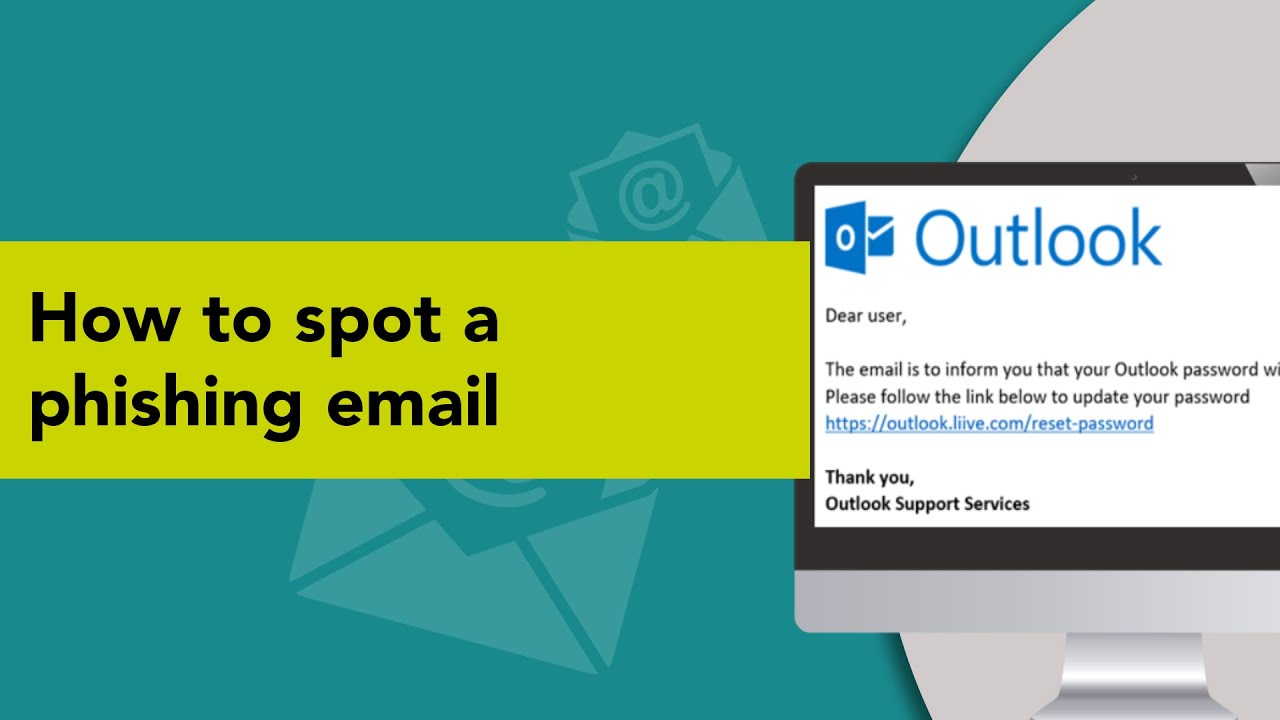
- Check the sender’s email address carefully to ensure that it is legitimate. Phishing emails often use email addresses that are similar to the legitimate entity, but with slight variations, such as a different domain name.
- Phishing emails often use generic greetings, such as “Dear Customer” or “Dear Sir/Madam”. Legitimate entities usually address the recipient by their name.
- Phishing emails often create a sense of urgency to prompt the user to act quickly. Be wary of emails that claim that your account will be suspended or that you have been a victim of fraud.
How to Spot a Phishing Email: Tips for Spotting and Avoiding Phishing Emails
Phishing emails are a common form of cyberattack that can be difficult to detect. However, there are some tips and best practices that can help you spot and avoid phishing emails.
Be cautious of any email that contains links or attachments, especially if you weren’t expecting them. Hover over the link to see the URL, and check that it leads to a legitimate website.
Phishing emails often come from email addresses that are similar to the legitimate entity, but with slight variations. Be sure to check the sender’s email address carefully.
Be wary of emails that ask for personal information, such as your login credentials or credit card information. Legitimate entities usually do not ask for this information via email.
Be on the lookout for red flags such as generic greetings, poor spelling and grammar, and a sense of urgency.
Keep your operating system, antivirus, and other software up to date to protect against vulnerabilities that can be exploited by attackers.
Two-factor authentication provides an extra layer of security by requiring a second form of authentication, such as a code sent to your phone, in addition to your password.
Educate yourself and your employees about the risks of phishing emails and how to spot them. Provide training and resources to help them stay vigilant.
How to Spot a Phishing Email: What to Do If You Suspect a Phishing Attempt
If you suspect that you have received a phishing email, it is important to take immediate action to protect your personal information and prevent further damage. Below are some steps to take if you suspect a phishing attempt:
- Do not click on any links or download any attachments: If you suspect that an email is a phishing attempt, do not click on any links or download any attachments. These could contain malware that can infect your computer or steal your personal information.
- Report the email to your IT department or security team: If you are at work, report the email to your IT department or security team. They can investigate the email and take steps to prevent further attacks.
- Contact the legitimate entity: If the phishing email appears to be from a legitimate entity, such as a bank or social media platform, contact them directly to report the phishing attempt. They may have a process in place for reporting these types of attacks.
- Change your passwords: If you have clicked on a link in a phishing email and entered your login credentials, change your passwords immediately. Use strong, unique passwords that are difficult to guess or crack.
- Run a virus scan: If you have clicked on a link or downloaded an attachment from a phishing email, run a virus scan on your computer to check for malware.
- Be vigilant for future phishing attempts: Once you have identified a phishing email, be on the lookout for future attempts. Attackers may try to target you again, so it is important to stay vigilant and be cautious when opening emails.









