Multiple Faces Detected



 February 26th, 2026
Selling on Amazon has never been more competitive or more dangerous.
In 2025, account takeover fraud cost Amazon sellers and buyers more than $262 million in reported losses, according to the FBI. Amazon itself took down over 55,000 phishing websites and shut down 12,000 phone numbers being used to impersonate the platform. Meanwhile, listing hijackers, fake refund scammers, and fraudulent buyers continue to drain profits from sellers who do not know how to fight back.
This guide walks you through how to use Seller Central to lock down your account against the most common scams targeting sellers in 2026 and how to use the same platform to optimize your listings, protect your brand, and drive more sales.
If you ever suspect that a buyer, seller, or person contacting you through the platform is not who they claim to be, you can run a reverse search on Social Catfish to verify their identity before responding or sending anything.
What Is Amazon Seller Central
Amazon Seller Central is the web-based hub where third-party sellers manage every aspect of their Amazon business. From listing products and managing inventory to running ads, monitoring account health, and handling customer messages, everything runs through Seller Central.
It is also where you access Amazon’s built-in fraud protection tools, view your Account Health Rating, respond to claims and disputes, and enroll in programs like Brand Registry and the Transparency Program that protect your products from counterfeiters and unauthorized sellers.
Understanding what Seller Central offers and how to use it proactively is the difference between a business that constantly reacts to problems and one that prevents them from happening in the first place.
The Biggest Scams Targeting Amazon Sellers in 2026
Before covering how to protect yourself, it helps to understand exactly what you are up against.
Account Takeover and Phishing
Fraudsters send emails and make calls impersonating Amazon, claiming your account has been suspended, that there is a problem with a recent order, or that your payment information needs to be updated. The goal is to get you to hand over your login credentials or click a link to a fake Seller Central login page. Amazon’s own data shows that account issue scams represent 82% of reported impersonation cases. Once inside your account, attackers can redirect your payouts, alter your listings, and drain your inventory.
Listing Hijacking
Hijackers attach themselves to your product listing and sell counterfeit or completely different items under your ASIN. Customers think they are buying from you, receive something fake or nothing at all, and leave negative reviews that damage your account health rating and suppress your organic rankings. In 2026, Amazon’s enforcement systems have become more sensitive to Order Defect Rate fluctuations, which means a hijacker on your listing can trigger account penalties before you even realize what is happening.
Fake Refund and Return Fraud
Buyers claim an item never arrived despite tracking confirming delivery, return a used or damaged item in place of the original, or dispute a legitimate transaction with their credit card provider after receiving the product. With Amazon’s 2026 return policy changes reducing the refund window to 7 days for seller-fulfilled orders, these scams now move faster than ever and require immediate documentation to contest.
Fake Account Suspension Notices
Scammers contact sellers by phone, email, or text, claiming their Amazon account has been suspended and demanding payment or personal information to resolve it. These messages often look convincingly official, complete with Amazon branding and urgent language. The rule is simple: Amazon always communicates account issues through your Seller Central dashboard. If it is not visible there, it is not real.
Unauthorized Sellers and Counterfeit Products
Third parties list under your brand without authorization, undercutting your prices with inferior or counterfeit versions of your product. This erodes your Buy Box win rate, floods your listing with negative customer experiences, and can lead Amazon to question the authenticity of your products entirely.
How to Use Seller Central to Protect Your Account
Enable Two-Factor Authentication Immediately
- Go to your Seller Central account settings and enable two-factor authentication if you have not already
- This requires a second verification step every time you log in. Even if a scammer has your password, they cannot access your account without the second factor
- Use an authenticator app rather than SMS codes wherever possible for stronger protection
Monitor Your Account Health Dashboard Daily
- Your Account Health Dashboard in Seller Central is the first place issues, policy violations, performance warnings, and compliance flags all show up before they escalate
- Set up alerts for rises in your Order Defect Rate, late shipment rate, and negative feedback rate
- Maintain an Account Health Rating above 250. Sellers who sustain this for six months receive a 72-hour buffer to address potential issues before action is taken
- Every performance notification is a pre-suspension warning; respond quickly with evidence rather than waiting
Never Engage With Unsolicited Communications
- Amazon will never contact you by phone, text, or unsolicited email to ask for your password, banking details, or payment to resolve an account issue
- All legitimate Amazon communications about your account appear directly in your Seller Central dashboard
- If you receive a suspicious message claiming to be from Amazon, log into Seller Central directly to verify never click links in the message itself
- Report suspicious contacts to Amazon through the Report a Scam page in Seller Central
Keep Detailed Records of Every Transaction
- Document every order with shipping confirmation, tracking numbers, and customer communications
- For high-value items, requiring a signature on delivery creates proof that the item was received and significantly reduces the success rate of fake refund claims
- Photograph items before shipping when fraud is a risk in your category
- Keep comprehensive records of supplier invoices and authenticity documentation in case Amazon requests verification
How to Use Brand Registry to Stop Counterfeiters and Hijackers
Amazon Brand Registry is one of the most powerful anti-fraud tools available to sellers, and it is free to enroll in if you have a registered trademark.
What Brand Registry Gives You
- Automated protections that monitor Amazon for listings using your brand name, logo, or product images without authorization
- The ability to report and remove counterfeit listings and unauthorized sellers directly through the Brand Registry portal
- Access to A+ Content, which lets you add rich images, comparison charts, and detailed descriptions to your listings, making them harder to hijack convincingly
- Amazon Brand Analytics, which gives you first-party data on search terms and market share to inform your sales strategy
How to Use It Against Hijackers
- Regularly check the New and Used offers tab on your product listings for unauthorized sellers
- Monitor your Buy Box win rate through your Buy Box Analytics report a sudden, unexplained drop is often a sign someone has jumped on your listing
- Watch for unusual spikes in returns or claims about damaged or counterfeit items, which can indicate a hijacker sending out poor-quality stock under your ASIN
- When you identify an unauthorized seller, send a direct message through Amazon’s system requesting proof of authorization, then escalate through the Brand Registry portal with the ASIN, URLs, and seller information if they do not respond
The Transparency Program
Amazon’s Transparency Program assigns a unique serialized code to each unit of your product. Customers can scan the code to verify authenticity before purchase, and Amazon scans the codes when products enter FBA warehouses, automatically blocking non-enrolled units from reaching customers. This makes counterfeiting your product significantly harder and builds buyer trust.
How to Use Seller Central to Boost Sales in 2026
Security and sales growth are not separate concerns on Amazon; a protected account with strong metrics performs better algorithmically. Here is how to use Seller Central to drive both.
Optimize Your Listings for the A10 Algorithm
Amazon’s A10 algorithm prioritizes conversion rate, organic sales velocity, and listing relevance above almost everything else. A well-optimized listing is both your primary sales driver and your best defense against hijackers, since a clear, authoritative listing is harder to manipulate convincingly.
- Title: Front-load your most important keyword and key product attribute in the first 80 characters this is what appears in mobile search results
- Bullet points: Answer the “so what?” question for each feature, focus on outcomes and benefits rather than just specifications
- Backend keywords: Use all available space in Seller Central’s backend keyword fields for synonyms, alternate spellings, and related terms that do not fit naturally in your visible listing
- Images: Your first three images sell the story, a clean hero shot on white, a lifestyle or outcome image, and a dimensions or compatibility image. High-quality images increase conversion rate and make your listing significantly harder to hijack convincingly
- A+ Content: Available to Brand Registry sellers, A+ Content can boost conversion rates by replacing the standard product description with rich multimedia content, comparison charts, and detailed feature breakdowns
How Social Catfish Helps Amazon Sellers
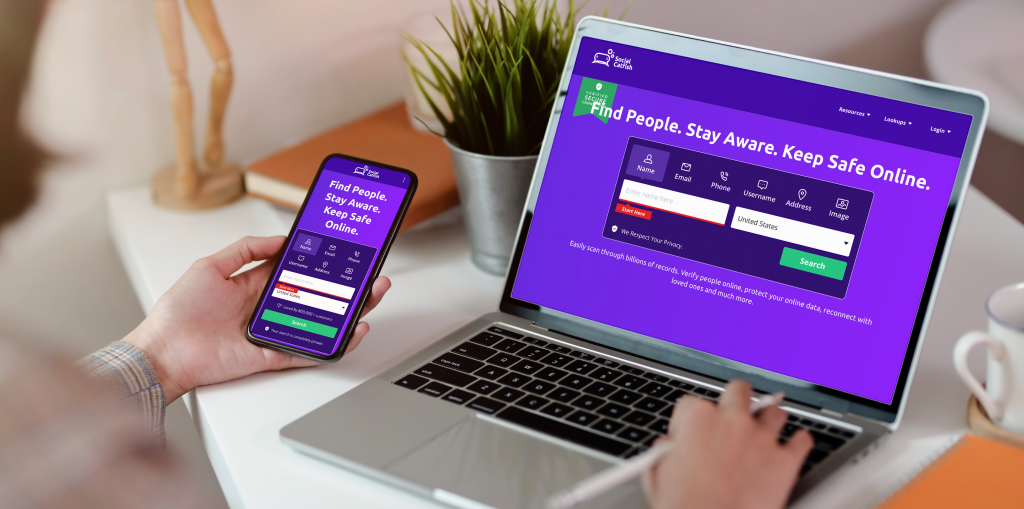
When a scam involves an actual person, a suspicious buyer, a potential supplier, or someone contacting you outside of Amazon’s systems, Social Catfish gives you the tools to verify who you are dealing with.
Reverse Phone Lookup
If someone calls you claiming to be from Amazon Seller Support or contacts you about a transaction from an unknown number, a reverse phone lookup on Social Catfish can tell you who that number actually belongs to before you engage.
Email Search
Scammers frequently contact sellers from email addresses designed to look official. A Social Catfish email search can identify whether an address is linked to a real person or has been flagged in connection with fraudulent activity.
Reverse Image Search
If a buyer or supplier sends you a profile photo or identification and something does not feel right, a reverse image search can reveal whether that photo is real or has been stolen from someone else, a common tactic in supplier scams and off-platform payment fraud.
Name and Address Search
Before sending high-value inventory to a new buyer or establishing a relationship with an unfamiliar supplier, a Social Catfish name or address search can cross-reference the details against public records to give you a clearer picture of who you are actually dealing with.
Top 5 Frequently Asked Questions
All legitimate Amazon communications about your seller account appear in your Seller Central dashboard under Performance Notifications or in the Messages section. If you receive an email claiming there is an account issue and it is not visible in your dashboard when you log in directly, it is a scam. Never click links in the email itself; always navigate to Seller Central by typing the URL into your browser.
First, check the New and Used offers tab on your listing to confirm and document the unauthorized seller. If you are enrolled in Brand Registry, file a report through the Brand Registry portal with the ASIN, seller information, and any evidence of counterfeit goods. You can also send a cease and desist message through Amazon’s messaging system. Purchasing one of the hijacker’s units to document the counterfeit is a commonly used step that strengthens your case when escalating to Amazon.
File a SAFE-T claim in Seller Central if you are a seller-fulfilled merchant. This is Amazon’s reimbursement program for cases where you followed all policies but still face a loss due to buyer fraud. Provide your tracking number, delivery confirmation, and any additional proof such as signature confirmation or photographic evidence. Act quickly, as Amazon’s updated 2026 timeline has shortened the window for submitting these claims.
Your Account Health Rating directly influences how Amazon ranks your products in search results. A declining rating reduces your seller authority, suppresses your listings’ organic visibility, and increases the likelihood of Amazon taking enforcement action. Maintaining a rating above 250 not only protects your account but also gives you a buffer period to address issues before penalties are applied.
No. Keeping all communications within Amazon’s Buyer-Seller Messaging system protects you in disputes because Amazon can access those records. Moving off-platform removes that protection entirely and is a major red flag for fraud. Legitimate buyers and suppliers have no reason to insist on communicating outside Amazon’s system. If someone is pressuring you to move to email, WhatsApp, or another channel, treat it as a warning sign and verify their identity before proceeding.
Conclusion
Amazon Seller Central gives you every tool you need to both protect your business and grow it, but only if you use it proactively. The sellers who get hit hardest by scams in 2026 are the ones who treat security as a reactive problem rather than a daily habit.
Check your Account Health Dashboard regularly, enroll in Brand Registry, document every transaction, and never engage with unsolicited messages claiming to be from Amazon. Those habits alone will put you significantly ahead of most sellers on the platform.
And when something feels off about a buyer, seller, or outside contact, run a search on Social Catfish before you respond. Knowing who you are actually dealing with is always worth the extra minute.