

 Multiple Faces Detected



 March 3rd, 2026
To search OnlyFans for a specific creator or account, you need to use a third-party search tool or method. OnlyFans does not have a built-in public search function like Instagram or Twitter, and without knowing someone’s exact username, the platform gives you no way to look them up directly.
However, there are proven methods that work. Depending on what information you have available, you can search OnlyFans by name, photo, email address, phone number, or location. Each method has a different success rate and some require more information than others, but together they cover virtually every search scenario.
This guide walks through every method for searching OnlyFans in 2026, starting with the fastest and most reliable approach. For searches that go beyond a simple username lookup, we use Social Catfish, a reverse search tool that cross-references information across multiple platforms simultaneously to find and verify OnlyFans profiles.
How to Use an OnlyFans Finder Tool
The fastest way to search OnlyFans is to use a dedicated OnlyFans finder tool, which lets you locate profiles using a name, photo, email address, or phone number without needing to know someone’s exact username.
Speed and accuracy. Manual searches can take hours with no guarantee of success. Professional finder tools deliver results in under 30 seconds.
Multiple search options. You can search by username, real name, email address, phone number, or even by photos. This flexibility dramatically increases your success rate.
Extensive database access. Tools like Social Catfish scan millions of profiles across multiple platforms simultaneously.
How to Use Social Catfish’s OnlyFans Finder
Here’s the step-by-step process:
Step 1: Visit Social Catfish and select the search type. You can choose from username search, OnlyFans finder by image, OnlyFans search by name, email lookup, or phone lookup.
Step 2: Enter your information. This could be the person’s real name, a suspected username, email address, or a photo upload.
Step 3: Run the search. The system scans OnlyFans and other platforms for matching profiles.
Step 4: Review results. You’ll see potential matches with profile previews and verification indicators.
Step 5: Verify the match. Cross-reference the results with other known information about the person.
The entire process takes less than five minutes. And unlike free methods, you consistently get reliable results.
But what if you want to try other approaches? Let’s explore additional methods.
How to Search OnlyFans by Name, Email, Phone, or Photo
OnlyFans does not have a native search function for any of these inputs, but third-party tools can search by name, email address, phone number, or photo by cross-referencing public data across multiple platforms to find connected OnlyFans profiles.
However, several proven techniques can help you locate specific profiles. Each method has different success rates and requirements.
Search by Username
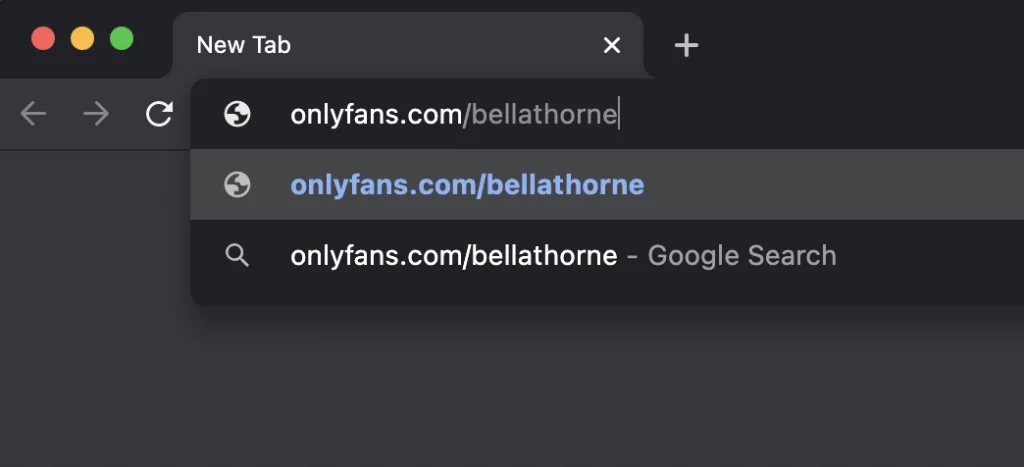
If you know someone’s OnlyFans username, finding them is straightforward. Simply add “onlyfans.com/” before their username in your browser address bar.
For example: onlyfans.com/username
This direct approach works when you have the exact username. But most people don’t advertise their OnlyFans usernames publicly.
Pro tip: People often use the same username across multiple platforms. Check their Instagram, Twitter, or TikTok handles. Many creators use consistent branding.
Search by Real Name
Searching by real name is trickier on OnlyFans. The platform doesn’t have a name-based search function.
If you’re looking for an OnlyFans face search, avoid sketchy tools that promise instant results. Social Catfish offers a more reliable approach by cross-referencing multiple databases and data points to help confirm whether profiles are connected to the same person.
Here’s what typically works:
- Social media connections: Look for links to OnlyFans on their other social profiles
- Bio information: Check if they mention OnlyFans in their Instagram or Twitter bios
- Professional finder tools: Use comprehensive search platforms that scan multiple sources
Search by Email Address
Email searches can be incredibly effective. Many people use the same email address across multiple platforms.
Social Catfish’s reverse email search can reveal whether an email address is associated with an OnlyFans account. This method works because:
- People often use primary email addresses for account creation
- Email addresses are harder to fake than usernames
- Cross-platform connections become visible through email matching
Search by Phone Number
Phone number searches work similarly to email searches. If you have someone’s phone number, you can potentially find their OnlyFans profile.
This method helps verify whether someone is active on dating sites or other platforms. Phone numbers create digital footprints across multiple services.
Social Catfish’s reverse phone lookup can reveal OnlyFans connections along with other social media profiles.
Search by Photo
Photo searches are highly effective for detecting OnlyFans accounts. Many creators use the same photos across different platforms.
Reverse image search technology can match photos from OnlyFans with those from other social media accounts. This creates a connection that reveals the OnlyFans profile.
Here’s how photo searches work:
Upload the image to a reverse search tool. Social Catfish’s facial recognition search uses advanced AI technology.
Scan multiple platforms simultaneously. The tool checks OnlyFans, Instagram, Twitter, and other sites.
Match facial features and image characteristics. Even if photos are cropped or filtered, the technology can find connections.
Provide verification data to confirm matches. You get confidence scores and additional profile information.
This method is particularly effective because creators often promote their OnlyFans using photos from their main social media accounts.
How to Do an OnlyFans Location Search
An OnlyFans location search works by using tools that pull geographic data from profiles and cross-platform activity to find creators in a specific area, since OnlyFans itself does not offer a built-in location filter.
Location-based searches work because:
- Creators often mention their location in profiles
- Geographic data gets embedded in photos and posts
- Local promotion creates location-specific digital footprints
Understanding OnlyFans Search by Location
OnlyFans doesn’t have a built-in location filter. The platform focuses on content rather than geographic discovery.
However, external tools can identify location connections through various methods:
IP address tracking: Historical login data can reveal geographic patterns
Photo metadata: Images often contain location information
Cross-platform analysis: Other social media accounts may reveal location details
Local promotion patterns: Creators often promote locally first
Why Professional Tools Work Better
Manual location searches are incredibly time-consuming and often inaccurate. Professional tools like Social Catfish can process location data much more effectively.
Our system analyzes multiple data points simultaneously:
- Social media check-ins and posts
- Photo location metadata
- Cross-platform geographic indicators
- Historical activity patterns
This all-around approach delivers more accurate location-based results than manual methods, including approaches people try like “find OnlyFans by face.”
OnlyFinder vs Social Catfish: Which OnlyFans Search Tool Actually Works?
OnlyFinder is a free directory tool that works well when you already have a username or keyword, but it has significant limitations when you are trying to find someone using only a name, photo, or email address. For those scenarios, Social Catfish is the more reliable option because it cross-references multiple data sources simultaneously and provides identity verification rather than just a list of profiles.
OnlyFinder is a basic search tool that focuses primarily on username searches. While it can be helpful for simple queries, it has significant limitations:
Limited search options: OnlyFinder mainly works with usernames and basic profile information
Narrow database: The tool doesn’t cross-reference multiple platforms effectively
Basic verification: Results often lack the verification features needed for accurate identification
Why Social Catfish Offers Superior Results
Social Catfish provides a more comprehensive OnlyFans lookup solution because:
Multiple search methods: Username, email, phone, photo, and name searches all in one platform
Cross-platform analysis: We scan OnlyFans alongside Instagram, Twitter, dating sites, and more
Advanced verification: Our results include confidence scores and additional verification data
Professional accuracy: Built for investigators, journalists, and professionals who need reliable results
The difference becomes clear when you need to identify someone using limited information. Basic tools like OnlyFinder typically require exact usernames, and many “onlyfans finder by face” claims are unreliable and raise serious privacy concerns. Social Catfish can help verify identities using partial information and other legitimate data points.
Advanced OnlyFans Search: How to Find Someone You Know

Finding someone you know on OnlyFans requires a different approach than searching for a public creator, since people who keep their OnlyFans private rarely use their real name or consistent username across platforms.
OnlyFans Account Lookup: How to See if Your Partner is On It
If you’re looking for a partner (or someone you know personally), the goal should be clarity through public signals, not assumptions. Many people who use OnlyFans leave a trail they intend others to find, usually tied to promotion or consistent branding. Start with what’s openly available:
- Look for direct links or “link-in-bio” hubs. Creators often place their OnlyFans link in tools like Linktree, Beacons, or personal websites.
- Check for consistent usernames. People frequently reuse the same handle across platforms, or small variations of it.
- Scan for public promotional clues. Teasers, pinned posts, or subtle mentions can point back to an OnlyFans page.
When searching for how to find OnlyFans of people you know, if you don’t find anything publicly available, it’s best not to jump to conclusions or dig beyond what someone has chosen to share. In a relationship, honest communication is often the healthiest next step. In a relationship, honest communication is often the healthiest next step.
With that context in mind, here are the advanced techniques that make these searches more accurate:
Social Media Cross-Referencing
Most OnlyFans creators maintain a presence on other platforms. This creates opportunities for cross-referencing.
Check these platforms for OnlyFans connections:
- Instagram: Look for “link in bio” or OnlyFans mentions
- Twitter: Many creators promote OnlyFans content here
- TikTok: Creators often hint at OnlyFans without direct links
- Snapchat: Private story promotions are common
Social Catfish automates this cross-referencing process. Our social media search tools can simultaneously identify connections across multiple platforms.
Dating App Connections
Many OnlyFans creators also use dating apps for promotion or personal use. This creates additional search opportunities.
Our research shows connections between OnlyFans and:
These connections often provide additional verification data and contact information.
Username Pattern Analysis
People often use the same usernames across different platforms. Understanding common patterns can improve search success.
Common username patterns include:
- Consistent branding: Same username across all platforms
- Number variations: Adding numbers to existing usernames
- Platform-specific modifications: Slight changes for different sites
- Professional vs personal: Different usernames for different purposes
Social Catfish’s username search can automatically identify these patterns.
Safety and Privacy Considerations
OnlyFans searches raise important questions about privacy and safety. It’s crucial to understand the ethical implications.
Use Public Clues Responsibly
Many OnlyFans creators link their pages openly, so the safest way to find someone is to follow what they’ve chosen to share publicly. Start with the platforms where they already have a visible presence, like Instagram, X (Twitter), TikTok, Reddit, or a personal website. Creators often place direct links in bios, Linktree-style hubs, pinned posts, or story highlights to make their content easy to find.
As you look, focus on clear, intentional signals rather than assumptions. Examples of public clues include a verified link in their bio, a pinned post promoting their page, or preview content that explicitly points to OnlyFans. If there’s no public link or mention, refrain from trying to “connect the dots” through speculation or digging into private circles. Not everyone wants all aspects of their online life connected, and respecting that boundary is important.
Legal Considerations
Searching for OnlyFans profiles is legal when done for legitimate purposes:
- Personal verification: Confirming someone’s identity
- Professional research: Journalism or investigative work
- Safety concerns: Protecting yourself from potential scams
However, using found information for harassment, stalking, or other harmful purposes is illegal and unethical.
Protecting Your Own Privacy
If you’re concerned about your own OnlyFans privacy, consider these protection strategies:
Use unique usernames that don’t connect to other social media accounts
Limit cross-platform promotion to reduce searchable connections
Be cautious with personal information in profiles and posts
Regularly audit your digital footprint using tools like Social Catfish
Recognizing Scams and Fake Profiles
OnlyFans searches sometimes reveal fake profiles and scams. Here are the warning signs:
- Stolen photos: Images used across multiple fake profiles
- Inconsistent information: Details that don’t match across platforms
- Pressure tactics: Immediate requests for money or personal information
- Too good to be true: Profiles that seem unrealistic
Social Catfish can help identify these red flags through comprehensive profile analysis.
Troubleshooting Common Search Problems
OnlyFans searches don’t always work perfectly. Here are solutions to common problems:
No Results Found
If your search returns no results:
- Try alternative spellings of names or usernames
- Use different search methods (e.g., photo instead of name).
- Check for recent username changes on other platforms
- Expand your search criteria to include partial matches
Too Many Results
If you get too many potential matches:
- Add additional verification data to narrow results
- Cross-reference with other known information
- Use photo verification to confirm identity
- Check profile creation dates and activity patterns
Outdated Information
OnlyFans profiles change frequently. If information seems outdated:
- Run fresh searches regularly for updated results
- Check multiple platforms for recent activity
- Verify information through additional sources
- Use real-time search tools that update frequently
Frequently Asked Questions
An OnlyFans Finder is a tool that helps you locate someone’s OnlyFans profile even if you do not know their exact username. Tools like Social Catfish work by cross-referencing the information you provide such as a name, photo, email, or phone number against multiple databases and social platforms simultaneously to find matching profiles.
Some basic methods are free, such as searching Google with someone’s name and “OnlyFans,” or using directory tools like OnlyFinder for username-based lookups. However, free methods only work when you already have partial information. For searches by photo, email, or phone number, a professional tool like Social Catfish provides significantly more accurate results.
Social Catfish is the most comprehensive OnlyFans search engine because it lets you search by name, photo, email address, or phone number rather than requiring an exact username. Unlike directory-style tools such as OnlyFinder, it cross-references data across multiple platforms and provides identity verification results, not just a list of matching profiles.
Yes, reverse image search technology can match a photo against OnlyFans profiles and other social media accounts. Social Catfish’s facial recognition search scans across multiple platforms at once, making it one of the most effective ways to find someone’s OnlyFans using only a picture even if the photo is cropped or slightly different from what they use on their profile.
The most reliable way is to use Social Catfish’s reverse search, which lets you enter a name, phone number, email address, or photo and check whether any OnlyFans accounts are connected to that information. You can also check their social media bios for OnlyFans links, or run a Google search using their name plus “OnlyFans.”
Yes, searching for someone on OnlyFans is legal when done for legitimate purposes such as identity verification, personal safety, or professional research. However, using any information you find to harass, stalk, or harm someone is illegal regardless of how it was obtained.
Creators can make themselves harder to find by using a different name or username across platforms, but complete invisibility is difficult to achieve. Most people leave digital footprints consistent profile photos, linked social accounts, or email addresses that cross-platform search tools like Social Catfish can connect back to an OnlyFans profile.
Final Thoughts: Finding OnlyFans Profiles the Smart Way
Finding someone on OnlyFans requires the right approach and tools. While the platform doesn’t offer traditional search functionality, professional OnlyFans finder tools can quickly and accurately locate profiles.
Social Catfish provides the most thorough OnlyFans search solution available. Our advanced technology can find profiles using usernames, photos, emails, phone numbers, or real names.
The key is using multiple search methods and professional-grade tools. Manual searches are time-consuming and often unsuccessful. Professional tools deliver reliable results in minutes rather than hours.
Whether you’re verifying someone’s identity, conducting research, or protecting yourself from potential scams, the right search approach makes all the difference. Social Catfish combines multiple search technologies into one powerful platform that delivers the results you need.









