Multiple Faces Detected



 August 1st, 2026
An Epic Games account is the login layer that sits underneath Fortnite, Rocket League, Fall Guys, and every other game in Epic’s ecosystem. If you are trying to look someone up, the search looks different depending on what you are starting with — a display name, an email address, or an Epic Account ID. Here is how each approach works, where the platform’s own tools fall short, and how to verify who is actually behind an account when it matters.
Name Search Examples
To get more accurate results, enter the full name including at least First name, Middle name and Last name.
Email Search Examples
Phone Search Examples
Username Search Examples
Address Search Examples
Start typing the initial part of the address and select from the addresses given dropdown afterward.
We Respect Your Privacy.
What Is an Epic Games Account, Exactly?
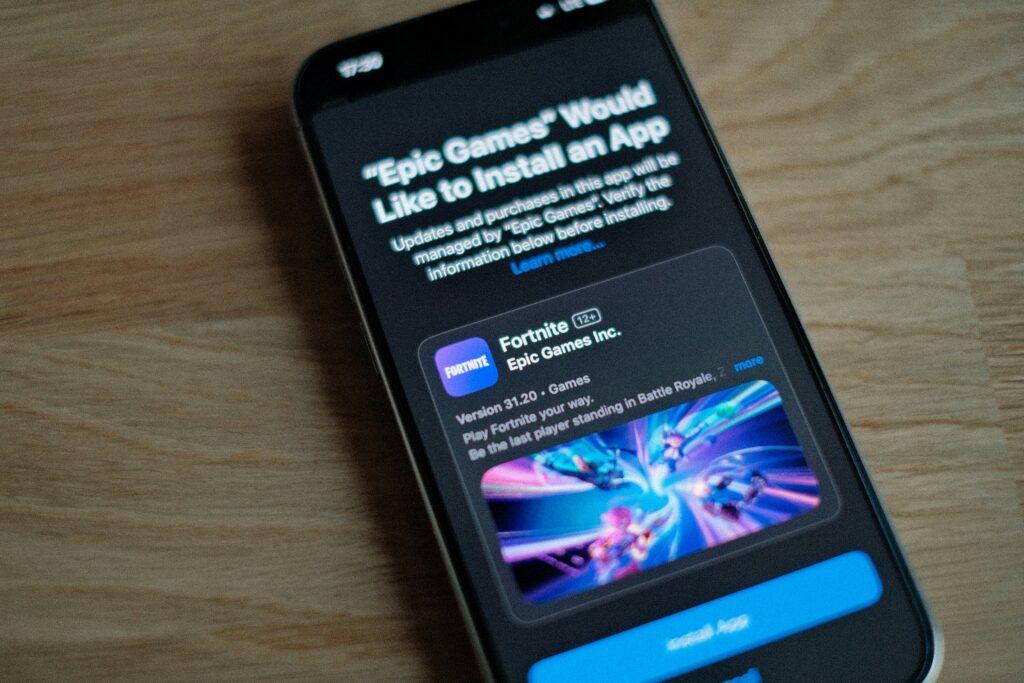
An Epic Games account is a single login that grants access to every Epic-published game. One account covers Fortnite, Rocket League, Fall Guys, and the Epic Games Store simultaneously.
Understanding the three distinct identifiers helps clarify what each lookup method can and cannot do:
- Display name — the public-facing username visible to other players in games and on Epic’s social features. This is what most people mean when they say someone’s Epic username. Display names are not unique across the entire platform, which means two players can share the same display name with different account IDs underneath.
- Email address — the email used to register the account. This is private and not visible to other players under any circumstances.
- Epic Account ID — a unique alphanumeric string assigned to every Epic account at creation. This never changes, even if the display name does. It is the only truly unique identifier in Epic’s system and is the most reliable way to reference a specific account definitively.
What Is an Epic Account ID, and How Do You Find It?
The Epic Account ID is the permanent unique identifier behind every Epic account. Unlike display names, which can be changed and duplicated, the Epic Account ID is fixed and assigned at account creation.
Finding Your Own Epic Account ID
Through the Epic Games website:
- Log into your account at epicgames.com
- Click your display name in the top right corner
- Select Account from the dropdown
- Navigate to the Account tab
- Your Epic Account ID appears in the Personal Details section as a long alphanumeric string
Through the Epic Games Launcher:
- Open the Epic Games Launcher on your device
- Click your account name in the bottom left corner
- Select Manage Account
- Your Epic Account ID is displayed in the account overview
Can You Look Up Someone Else’s Epic Account ID?
Not directly. Epic does not provide a public tool that lets you enter a display name and retrieve another player’s Account ID. The ID is visible to the account holder but is not exposed in any public-facing search.
What you can do instead:
- If you know their display name, search it in the Epic Friends system or through game-specific tools covered below
- Use third-party stat trackers like Tracker Network at tracker.gg, which index public player data by display name across Fortnite and Rocket League and sometimes surface Account ID information for publicly visible profiles
- Cross-reference their display name across platforms if you need to confirm identity rather than just find the account
Can You Search Someone’s Epic Account by Email?
No. Epic Games does not provide a public tool to search for an account by email address. The email associated with an Epic account is private account data and is not visible to other players or searchable through any official Epic interface.
What You Can Do If You Only Have an Email
The forgot password check:
Go to epicgames.com and click Sign In, then Forgot your password. Enter the email address and Epic will confirm whether an account is registered to it by offering to send a reset link. This confirms account existence but reveals nothing about the display name, game history, or any other profile information.
Social Catfish reverse email search:
Enter the email address into Social Catfish’s reverse email lookup. The search cross-references the address against platform registrations, social media accounts, and identity databases simultaneously. If the email is linked to any public profiles including gaming community accounts, Discord servers, or social media where the person has used the same address, those connections surface alongside the identity associated with the email.
This is particularly useful when you have an email from a gaming contact and want to confirm who is actually behind it before engaging further, especially if the interaction has moved off the game platform into direct communication.
Name Search Examples
To get more accurate results, enter the full name including at least First name, Middle name and Last name.
Email Search Examples
Phone Search Examples
Username Search Examples
Address Search Examples
Start typing the initial part of the address and select from the addresses given dropdown afterward.
We Respect Your Privacy.
Verifying Who Is Behind an Epic Games Account
Finding an Epic account by display name or confirming one exists through the email check tells you the account is real. It does not tell you who is operating it. That gap matters most in specific situations:
- A trading partner in any Epic game marketplace requests a transaction and you want to confirm their identity before sending items or payment
- Someone you met through an Epic game has moved the conversation to Discord or direct messaging and you want to verify who they actually are
- A Fortnite account is offering a deal, a boosting service, or a transaction that requires trust before any exchange
Username Search
Enter their Epic display name into Social Catfish’s username search. The search cross-references the handle across hundreds of platforms simultaneously, returning every account where that username is active. Most players use consistent handles across Epic, Steam, Discord, Reddit, and social media. Finding the same username under a real name on any other platform connects the Epic account to a verifiable identity.
Reverse Image Search
If the person has shared any photo through Discord, social media, or any other channel alongside their Epic contact, upload it to Social Catfish’s reverse image search. The facial recognition finds where that face appears online and under what names, confirming whether the identity they have presented is consistent across platforms or whether the photos belong to someone else entirely.
Reverse Phone or Email Search
If they have shared contact details outside of Epic’s platform, enter those into Social Catfish’s reverse phone or email lookup. The search returns the real name and linked accounts registered to those details, confirming whether the identity behind the Epic account holds up against independent sources.
All searches are completely confidential. The person being searched receives no notification.
Looking Up Fortnite-Specifically? See Our Dedicated Guide
Epic Account lookup covers the platform layer that underlies every Epic game. If your search is specifically about Fortnite player stats, Fortnite username lookup, or finding someone’s Fortnite account by in-game name, our dedicated Fortnite Account Lookup guide covers those searches in full detail, including the game-specific stat trackers and in-game friend search tools that go beyond what the Epic platform search provides.
FAQ
Search the display name through the Epic Friends system in any Epic game, through the Epic Games Launcher’s friend search, or through third-party stat trackers like Tracker Network at tracker.gg. Note that display names are not unique on Epic, so two accounts can share the same name with different Account IDs underneath.
Your Epic Account ID is a unique permanent alphanumeric identifier assigned to your account at creation. Find it by logging into epicgames.com, clicking your display name, selecting Account, and navigating to the Personal Details section. It also appears in the Epic Games Launcher account overview. You cannot look up another player’s Account ID through any official Epic tool.
Not through any official Epic tool. The forgot password flow at epicgames.com confirms whether an account exists at a specific email address, but reveals no other information. Social Catfish’s reverse email search is more comprehensive, cross-referencing the address against platform registrations and social media accounts to surface the identity associated with it.
No. Epic does not operate a public directory where you can browse or search accounts by name, email, or ID. Display name search is available in the Friends system and in individual games, but there is no web-based public account lookup tool on Epic’s official platform.
Enter their display name into Social Catfish’s username search to find every platform where that handle is active. Upload any photo they have shared to Social Catfish’s reverse image search to confirm whether it belongs to a consistent real identity. If they have shared contact details, run those through Social Catfish’s reverse phone or email lookup. All searches are completely confidential, with no notification sent to the person being searched.
Conclusion
Epic account lookup works differently depending on what you are starting with. Display name search works through the Friends system and third-party trackers. Email confirmation works through the forgot password flow. Epic Account ID is findable for your own account but not publicly searchable for others. When finding the account is not enough, and you need to confirm who is actually behind it, Social Catfish’s cross-platform username, reverse image, and contact searches cover the identity layer that Epic’s own tools are not designed to provide.
Name Search Examples
To get more accurate results, enter the full name including at least First name, Middle name and Last name.
Email Search Examples
Phone Search Examples
Username Search Examples
Address Search Examples
Start typing the initial part of the address and select from the addresses given dropdown afterward.
We Respect Your Privacy.